ERP vs POS: What Growing Retail & Distribution Businesses Actually Need
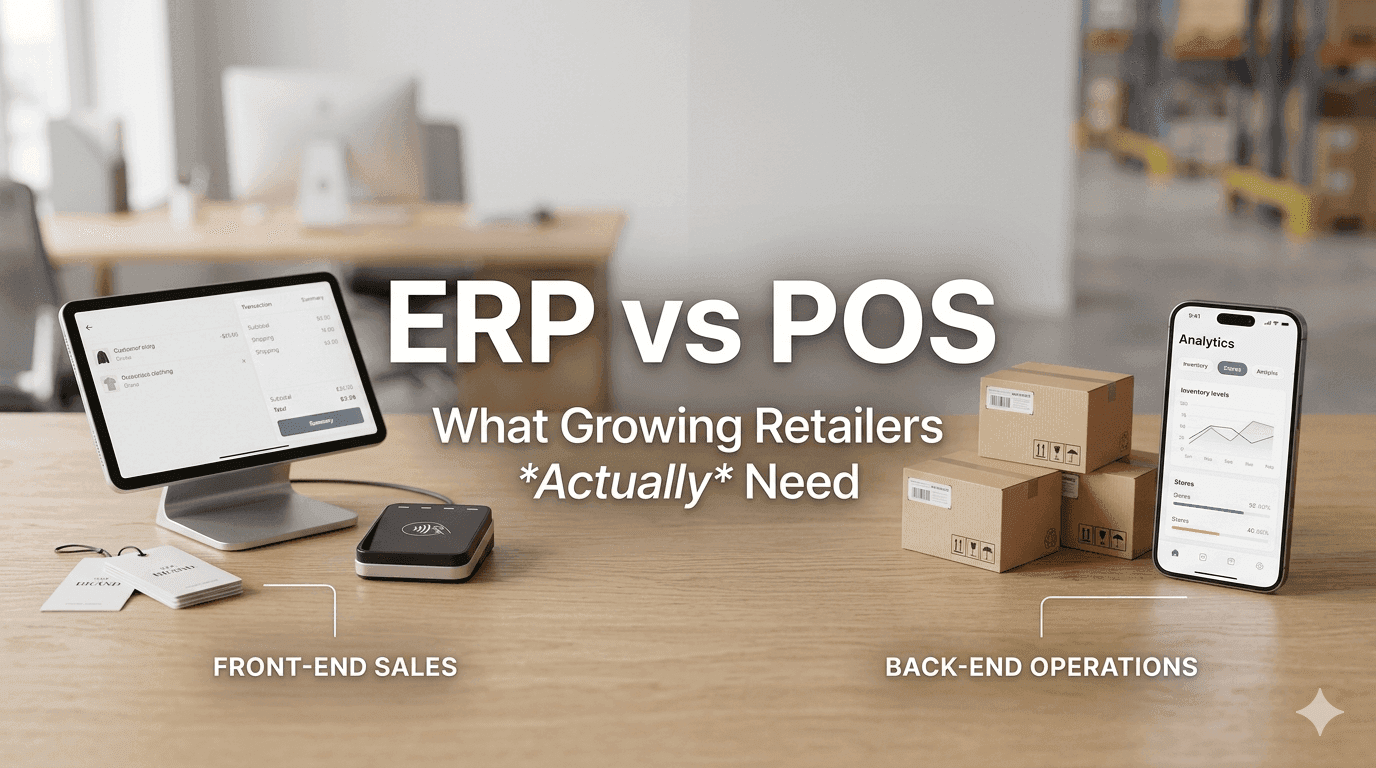
POS doesn’t mean ERP. But the truth is growing businesses need both, for very different reasons.
Table Of Contents
Where Most Businesses Start: The POS System
The Growth Trap: When POS Starts Showing Its Limits
What an ERP System Actually Does
The Real Difference
What Changes When POS and ERP Work Together
A Real-World Scenario: Before and After
The Workaround Trap (And Why It's Costing You)
When Is the Right Time to Move to ERP?
Choosing the Right ERP: What to Look for in the Indian Market
The Bottom Line
There's a moment most retail business owners in India know intimately.
Sales are climbing. New stores are opening. The team is expanding. By every external measure, the business is succeeding. But something feels off. Stock is running out at some locations while gathering dust at others. Purchasing decisions are still based on gut feeling or hurried WhatsApp messages from store managers. And pulling together a clear picture of what's actually happening across the business? That takes hours of Excel gymnastics every week.
This is the moment where the POS vs ERP question stops being theoretical and becomes urgent.
The confusion is understandable. Both systems deal with inventory. Both record sales. Both are described by software vendors in language that sounds almost identical. But they solve fundamentally different problems and understanding that difference can be the inflection point between a business that scales confidently and one that quietly starts losing control of its own growth.
Let's talk through this clearly.
Where Most Businesses Start: The POS System
A Point of Sale system is exactly what the name suggests, it manages what happens at the point where a sale takes place.
At its core, a good POS handles:
Billing and invoicing - fast, accurate, barcode-driven
Payment processing - cash, cards, UPI, wallets
Basic inventory reduction - stock decrements automatically when an item is sold
Discounts and promotional offers - applied at checkout without manual intervention
Daily sales reports - end-of-day summaries, category-wise breakdowns
Customer data capture - phone numbers, purchase history, loyalty points
For a business with one or two stores, a manageable SKU count, and an owner who is closely involved in day-to-day operations, a POS system genuinely does feel like a complete solution. Billing is faster, errors at the counter reduce, and there's a clean digital record of every transaction.
And honestly, for that stage of business, it is enough.
The problem isn't that POS systems are inadequate. The problem is that most businesses outgrow them before they realize it.
The Growth Trap: When POS Starts Showing Its Limits
Retail and distribution businesses in India tend to scale fast once momentum builds. A single successful store becomes three. Three become eight. SKUs multiply. A warehouse enters the picture. Teams grow and the owner can no longer be physically present to oversee everything.
This is when the gaps in a POS-only setup start to widen slowly at first, then all at once.
Inventory becomes a guessing game.
One store is regularly out of fast-moving sizes or variants. Another has shelves full of products that haven't moved in months. The warehouse shows one number; the physical count tells a different story. Transfers between locations happen informally, tracked (if at all) on spreadsheets or through WhatsApp voice notes.
Purchasing shifts from data-driven to instinct-driven.
Without a system that connects actual sales velocity to purchase decisions, orders get placed based on what the buyer remembers selling. The result is predictable: overstock on slow-moving items that blocks working capital, and stockouts on bestsellers that cost actual sales.
Reporting becomes a manual exercise.
Each store produces its own report. Comparing performance across locations requires someone to manually pull data, clean it, and consolidate it usually in Excel. By the time the report is ready, it's reflecting decisions that were made a week ago.
The POS keeps doing its job perfectly. It keeps recording every sale accurately and billing customers quickly. The issue is that it was never designed to manage a business only to serve as the interface at the counter.
What an ERP System Actually Does
Enterprise Resource Planning (ERP) is a significantly different category of software, and the name doesn't do a great job of communicating that.
In practical terms, an ERP is a centralized business management platform that connects every operational function under one roof:
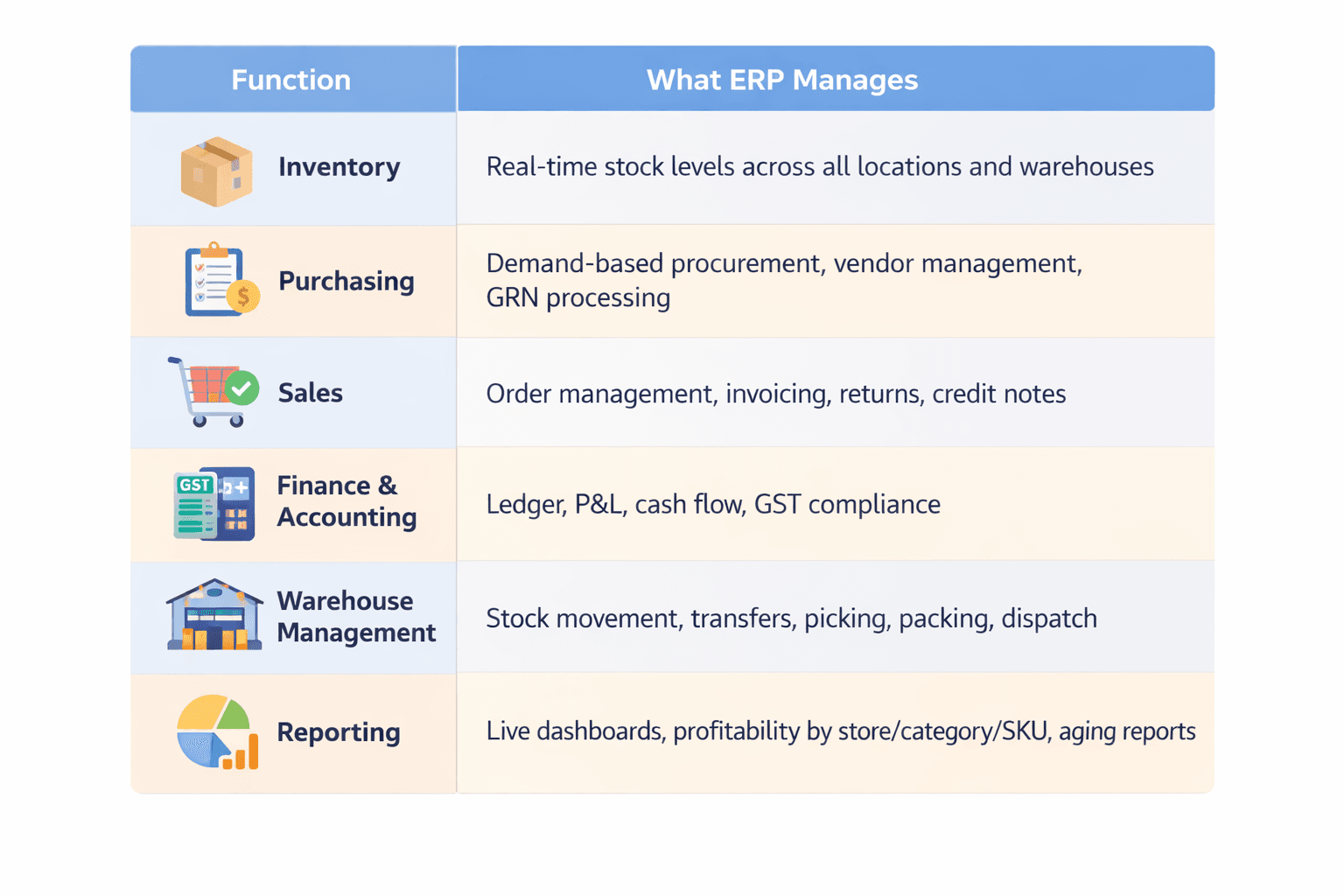
The defining feature of a well-implemented ERP is that there is one version of the truth across the entire business. When a sale happens at Store 7 in Pune, inventory levels update in real time. The warehouse knows what's been sold. The accounts team sees the revenue entry. The purchase manager sees that Stock X is approaching reorder level. Everything is connected.
ERP doesn't make billing faster. That's not its job. ERP makes the business governable especially when it's grown beyond the point where one person can hold all the information in their head.
The Real Difference
Here's a way to think about it that cuts through the complexity:
A POS system answers the question: "What did we sell today?"
An ERP system answers the question: "How is the entire business performing, and what should we do next?"
Both questions matter. They just operate at different levels.
What Changes When POS and ERP Work Together
The strongest retail businesses whether they're fashion brands, FMCG distributors, electronics chains, or pharmacy networks don't choose between POS and ERP. They integrate both.
The POS handles the customer-facing experience. It's fast, intuitive, and designed for the counter. The ERP sits behind it, absorbing data from every transaction and translating it into operational intelligence.
When this integration is done well, here's what becomes possible:
Real-Time Visibility Across All Locations
The head office can see live inventory at every store and warehouse. Instead of calling store managers for updates, they're looking at a dashboard. Instead of discovering a stockout after a customer complaint, they're seeing the alert before the shelf empties.
Smarter, Automated Replenishment
ERP systems can be configured with reorder levels minimum stock thresholds that trigger a purchase requisition or transfer automatically. This means replenishment is based on actual movement data, not someone's memory of what sold last month.
Demand-Driven Purchasing
When the system knows what's selling where, and at what rate, purchase decisions stop being guesswork. Buyers can see which SKUs are moving fastest in which regions, which are aging, and what the current open orders look like. This directly reduces dead stock and improves cash flow.
Centralized Financial Control
With ERP, every transaction flows into a single accounting system. GST entries are generated automatically. Month-end closing that used to take a week can be completed in hours. The owner or CFO can pull a P&L for any store, region, or product category in seconds.
Reduced Errors and Duplicate Work
In a POS-only environment, data often has to be re-entered into accounting software, transferred to Excel for analysis, and manually reconciled with warehouse records. ERP eliminates this duplication. Data enters once, at the source, and flows through the entire system.
A Real-World Scenario: Before and After
Consider a mid-size ethnic wear brand with 18 outlets across Maharashtra and Gujarat, plus a central warehouse in Surat.
Before ERP integration:
Store managers call the warehouse team daily. "We're out of the blue kurta in size M." "The embroidered dupatta is piling up, nobody's buying it." The warehouse team maintains their own Excel tracker. Purchase orders are placed based on what the merchandising team feels is missing. New stock reaches stores two to three weeks after the need arises. The accounts team spends four days every month reconciling sales data from 18 different store reports.
After ERP + POS integration:
The merchandising team opens a dashboard each morning. They see exactly which SKUs are below reorder level at which stores, which items have zero movement for 45 days, and which variants are outselling expectations. Transfer orders are initiated digitally and tracked end-to-end. Purchase orders are generated with one click based on pre-set formulas. Month-end closing happens in a day. The owner can evaluate individual store profitability without leaving the office.
Same stores. Same inventory. Entirely different level of control.
The Workaround Trap (And Why It's Costing You)
When businesses feel the limitations of their POS system, the instinct is to patch the gap rather than address it structurally. The typical workaround looks like this:
POS + Excel + WhatsApp + manual tracking + one dedicated person to hold it all together.
This works. For a while.
But it has a ceiling, and the ceiling is lower than most business owners realize. The Excel sheets grow unwieldy. The dedicated person becomes a single point of failure. Errors multiply because data is being copied and re-entered across systems. Decision-making slows because nobody trusts the numbers until the reconciliation is done.
More dangerously, this setup feels manageable even as the problems quietly compound. By the time the dysfunction becomes undeniable, the business has usually already absorbed significant losses in dead stock, in missed purchasing decisions, in the opportunity cost of decisions made on incomplete information.
The businesses that transition to ERP before they hit the wall tend to scale much more smoothly than those that wait for a crisis to force the change.
When Is the Right Time to Move to ERP?
There's no single answer, but these signals are reliable indicators that the conversation needs to happen:
You have more than 3 stores or locations
You manage more than 500-1,000 active SKUs
You have a warehouse or distribution center in the picture
Inventory reconciliation is taking more than a day per month
You have more than one person involved in purchasing decisions
You find yourself making purchasing decisions based on "feel" rather than data
Month-end financial closing regularly takes more than 3-4 days
If more than two or three of these are true simultaneously, a POS-only setup is likely already limiting your growth even if it doesn't feel that way yet.
Choosing the Right ERP: What to Look for in the Indian Market
Not all ERP systems are created equal, and the Indian retail and distribution context has specific requirements:
GST compliance built in. This is non-negotiable. The ERP must generate GST-compliant invoices, handle HSN codes, manage input tax credit, and produce GSTR-ready reports without manual intervention.
Strong inventory management. Batch tracking, expiry management (critical for FMCG and pharma), multi-warehouse support, and accurate stock aging reports should all be native capabilities.
POS integration. The ERP needs a direct, real-time integration with your POS not a nightly sync, but live data flow. Any gap here defeats a large part of the purpose.
Scalability. The system you implement today should handle twice your current business without requiring a platform change. Migrating ERP is expensive and disruptive.
Local implementation support. ERPs require configuration, training, and ongoing support. A vendor with a strong local presence or partner network matters significantly in the Indian context.
Some platforms commonly used by Indian retail and distribution businesses include Tally Prime (with add-ons), SAP Business One, Microsoft Dynamics 365, Increff, and several India-first solutions like Unicommerce, Peddle Plus One ERP, and GoFrugal depending on business size and complexity.
The Bottom Line
POS and ERP are not competitors. They are complementary tools designed for different layers of a business.
The POS is the face of your business the system your customers interact with, where transactions happen, where speed and accuracy matter most.
The ERP is the spine of your business the system that connects every function, ensures every decision is informed by real data, and gives you the structural foundation to scale without losing grip.
Most Indian retail businesses don't struggle because their sales are too low. They struggle because their operations have outgrown their systems. The processes that worked at three stores create friction at eight, and real damage at fifteen.
Investing in ERP at the right stage isn't an IT expense. It's the infrastructure that makes everything else your team, your suppliers, your customer experience, your cash flow work the way it's supposed to.
The question isn't whether you'll eventually need it. It's whether you'll move before the gap becomes a crisis, or after.
Have questions about transitioning from a standalone POS to an integrated ERP setup? Or looking to understand which system fits your current business stage? Feel free to reach out.
If any of this felt familiar, the POS that's doing its job but leaving you guessing, the Excel sheets that quietly multiplied, the decisions still made on gut feel then maybe it's time for a different kind of conversation.
Will start with Just an honest look at where your business actually stands.
Reach out to the team at Peddle Plus One ERP. We'll start with your business not with our software.
Frequently Asked Questions
What is the simplest way to understand the difference between POS and ERP?
Think of it this way ,a POS system manages what happens at the counter, while an ERP manages what happens behind the entire business. POS is about speed and accuracy at checkout. ERP is about visibility, control, and making informed decisions across every function purchasing, inventory, finance, warehousing, and reporting.
Can a POS system replace an ERP entirely?
No, and trying to make it do so is one of the most common (and costly) mistakes growing businesses make. A POS is purpose-built for the transaction layer billing, payments, and basic stock reduction. It simply doesn't have the architecture to handle multi-location inventory management, demand-based purchasing, financial consolidation, or operational dashboards. At a certain scale, the absence of ERP starts costing money even if it isn't immediately visible.
Can an ERP replace a POS?
Not effectively, no. ERP systems are powerful for back-office operations but are generally not optimized for the speed, simplicity, and customer-facing experience required at a retail counter. The ideal setup is both working together POS at the front, ERP as the backbone.
Is ERP only for large businesses or enterprises?
This is a common misconception. While ERP was historically associated with large corporations, the landscape has changed significantly. Today, there are ERP platforms specifically built for mid-size and even growing small businesses including India-first solutions like Peddle Plus One ERP, GoFrugal, Unicommerce, and Increff that are designed for retail and distribution at a realistic price point. If you have multiple locations, a warehouse, or a large SKU count, ERP is worth evaluating regardless of your company size.
At what stage should a retail business start thinking about ERP?
There's no single rule, but here are reliable signals that the conversation should begin: You have 3 or more stores or locations You manage more than 500–1,000 active SKUs A warehouse or distribution center is part of your operations Inventory reconciliation regularly takes more than a day Purchase decisions are based more on instinct than data Month-end financial closing takes longer than 3-4 days You have more than one person making purchasing or inventory decisions If two or more of these are true at the same time, a POS-only setup is likely already creating friction even if it doesn't feel critical yet.
We're managing fine with POS + Excel right now. Why should we change?
The POS + Excel combination works until it doesn't. The problem is that the breaking point is rarely dramatic. It's a slow accumulation of small errors, delayed decisions, and invisible losses. Dead stock that wasn't spotted early enough. A purchase order placed on stale data. A store that ran out of a bestseller for three days because nobody caught the signal in time. These costs are real, they're ongoing, and they're hard to attribute to any single cause, which is exactly why businesses tend to underestimate them. ERP doesn't just improve efficiency; it closes the gaps that silently drain margin.

Tamanna Bhardwaj
EditorContent Strategist at Peddle Plus with 4+ years of experience in brand growth and marketing, specializing in retail technology, ERP adoption, and business operations for Indian SMEs.